

LaunchPad
Home
LaunchPad OSComplete operating system for field service businessesLaunchPad MapRemote AI/AR property measurement software
LaunchPad OSLaunchPad Map
Implementation
AboutCareersContact Us
Log in
Home
LaunchPad OSLaunchPad Map
Implementation
AboutCareersContact Us
Log in

Measure any property remotely, in minutes

LaunchPad Map

Remote property measurement software, built for the way you actually bid. Without the windshield time.

Pull up an address from your desk and capture AI-assisted measurements from satellite imagery. Or, if on-site
measurements are needed, scan it with AR + LiDAR right from your phone. Get accurate lawn, bed, and hard surface numbers in less than a minute, add your scope, and send a quote you can trust in minutes, not hours.

Start with LaunchPad Map on its own — or get it built into every LaunchPad OS plan.

Start Your Free Trial See Plans & PricingWhat’s LaunchPad OS?
LaunchPadAI

What is LaunchPad Map?

Property measurement and quoting. For every kind of contractor who measures before bidding.

  • Lawn Care
  • Landscaping
  • Artificial Turf
  • Snow & Ice
  • Pest & Mosquito
  • Pressure Washing
  • Paving
  • … & Your Trade

Short answer: LaunchPad Map is remote property measuring and quoting software for contractors who have to know the square footage before they can price the job. Lawns, beds, hardscapes, sidewalks, driveways, parking lots — capture their measurements without a site visit, a measuring wheel, or a “close-enough” guess.

The old way vs LaunchPad Map

Measuring by hand is costing you the jobs you should be winning.

Every hour of windshield and wheel time is an hour you’re not selling. Every “close enough” estimate is margin you eat or a job you lose. Every trip back to re-measure is another day your competitor has to close the deal.

The old way

Hours per week lost to measuring by hand

  • Site visits to measure.Fuel, time, and half a workday gone before you can even bid the job — for numbers you’re still not sure are right.
  • The wheel and “close enough.”A wheel that skips, guesswork that pads the bid, a sketch on a clipboard. One number, no breakdown.
  • Quotes that take days.Guess wrong and it’s another site visit. By the time you get there the margin is gone — and the competitor has already sent their bid.
  • Data scattered everywhere.Notes in your truck, numbers retyped at the office, photos on a phone, the takeoff living in your estimator’s head.
The LaunchPad Map way

Minutes per job from measurement to sent quote

  • Measure from the address.AI measurements from satellite imagery at your desk, or AR + LiDAR as you walk the property. Your choice, same product.
  • Numbers you can bid against.AI detects surface areas on aerial imagery; AR + LiDAR trace beds and hardscapes in real time on iPhone or iPad.
  • Bids ready to send in minutes.Assemble a quote in your estimating software or sync directly to LaunchPad OS, and send your bid before a competitor can walk the site.
  • One property record.Measurements, photos, notes, and docs on one map your whole team can see.

Address → remote or on-site → measured → sent. No measuring wheel, no second trip, no guesswork.

Features at a glance

Every way to measure a property, in one place.

Every tool you need to measure anything in an instant: AI that measures from aerial imagery, AR + LiDAR that scans on-site, and drawing tools for everything in between — whatever the property calls for is already in your plan.

Capture remote measurements in an instant.

Measure accurately from your desk or your truck. No matter where the property is, you’ll get numbers you can trust using the aerial imagery that shows it best.

Watch the AI Measurements demonstration
  • One-click takeoffs.AI detects lawns, hard surfaces, and more, and returns the surface area automatically.
  • Multiple imagery sources.Switch to whichever source offers the best view of the property: Google, Mapbox, TomTom, or high-resolution Nearmap.
  • Any address, any market.Measure a property three states away the same way you’d measure one across the street.

Measure, edit, and quote from your desk.

Tap into a full measuring workspace in your browser. Draw, edit, layer, and label a property; assemble your quote in your estimating software; or sync the measurements directly to LaunchPad OS.

  • The complete drawing toolset.Point-to-point, freehand, brush, and cutout — from straight lines to curves to carve-outs.
  • Quote straight from the numbers.Carry the measurements over to your estimating software, or send them directly to LaunchPad OS to package into a proposal.
  • Export your measurements in the format you need.CSV, DXF, image, or PDF.

Scan a site with your phone as you walk it.

For jobs where on-site measurements are needed, trace lawns, beds, and hardscapes with your phone’s AR + LiDAR, capturing elevation and slope as you go. Your photos, notes, and measurements are saved directly to the property record.

  • Walk and trace.Capture any surface in real time as you walk the property. No measuring wheel and no guesswork.
  • Slope you can see.Map elevation as you walk and scan the site to document grade before crews show up. Export a 3D model (.OBJ) for CAD and design software.
  • Works offline.No signal? No problem. The measurements you capture stay on your device or in iCloud and sync once you’re back online.

Draw takeoffs right on your device.

Pull up any property on your iPad or iPhone and draw the takeoff with an Apple Pencil or your finger. LaunchPad Map’s full desktop toolset is available in your pocket — measure and quote without going back to the shop; no laptop required.

  • Capture every shape on the property.Point-to-point, freehand, brush, and cutout tools, all ready for use on your device.
  • Exclude what isn’t in scope.Carve out driveways, walkways, pools, buildings, or anything else not included in the scope as you draw.
  • Accurate from anywhere.Draw over live imagery from your truck, on a property, or over stored maps back at your desk. The numbers are quote-ready either way.

Pin every photo to its property.

Capture geo-tagged photos and documents in the field or from your desk. Attach them, annotated and organized, to the exact property they belong to — no more digging through the camera roll wondering which house you took them at.

  • Geo-tagged capture.Photos pin automatically to the right spot on the map as you shoot.
  • Mark it up.Flag problem areas on the property, add any necessary notes, and attach PDFs and site plans as needed.
  • Share a link, no login.Send an interactive map or an annotated report for approval or project alignment; no account is needed for the recipient to view them.

Measure with your site plan over the map.

The drawing on your desk and the property on the ground never quite agree. Put them on the same screen and work from both at once.

  • Drop in the plan.Position a CAD drawing, site plan, or PDF over live aerial imagery.
  • Two-point alignment.Match two points on the document to the map and the overlay snaps into place.
  • Measure on top of it.Pull measurements straight from your own plan.

Built for the field

If you measure properties to bid and win work, LaunchPad Map is for you.

Built for every kind of contractor who measures and quotes — the ones who can’t estimate until they know the numbers, and who lose time, margin, and jobs when measuring is slow, scattered, or guessed at. LaunchPad Map’s measurement engine speaks your trade’s language, no matter the property you’re pricing.

AREA PRECISION

A bad measurement doesn’t show up on the estimate. It shows up in your margin.

The difference between 4,800 and 6,200 square feet is a pricing tier, sometimes two. One wrong number and you’re either overpriced on the bid or eating the difference on the job.

  • Lawn Care
  • Landscaping
  • Artificial Turf
  • Pressure WashingPaving

ZONE MAPPING

The total lot size isn’t the number you need. Bid it zone by zone.

The lot has one total area. The job has four zones. Those aren’t the same measurement, and pricing off the wrong one costs you margin on every visit for the life of the contract.

  • Landscaping
  • Irrigation
  • Pest & Mosquito

SEASONAL CONTRACTS

Get every stop on the route right before the season starts.

Price one property too low and you absorb it on every single visit. A route of 40 properties is 40 estimates that have to hold up when you actually do the work.

  • Lawn Care
  • Snow & Ice
  • Pest & Mosquito

SURFACE DISCRIMINATION

Not everything on a property is in scope. Price what you’re actually doing.

Every surface you include or miss is margin you either keep or lose. Capture only the measurements you need for the work you’re bidding. Leave off the rest.

  • Landscaping
  • Artificial Turf
  • Snow & Ice
  • Pressure WashingPaving

How It Works

Three steps.
None of them include a site visit.

No implementation timeline, no weekend of training. Measure the property; refine the scope; assemble the quote in your estimating software, or sync directly to LaunchPad OS; and send your bid before a competitor can even walk the site. Most measurements take less than a minute.

  1. Step 1

    Measure

    Enter an address and let AI measure the property from aerial imagery — or trace it on-site with your phone’s AR + LiDAR. Lawns, beds, hardscapes, roofs, all measured in less than a minute.

  2. Step 2

    Add scope

    Refine the measurements to match the real job. Draw and carve out exclusions, overlay a site plan, and drop in geo-tagged photos and notes — all saved to one property record.

  3. Step 3

    Quote & Send

    Export to PDF, image, CSV, or DXF; share an interactive map link; assemble your quote in your estimating software, or sync the measurements directly to LaunchPad OS — and deliver your bid before the competition even drives out to measure.

The proof

Trusted by contractors who bid on precise numbers.

  • Lawn Care
  • Landscaping
  • Artificial Turf
  • Snow & Ice
  • Pest & Mosquito
  • Pressure Washing
  • Paving
  • … & Your Trade

With LaunchPad Map, the measurement you get is the number you quote.
No guessing, no re-entry, no rounding.
And no site visit required.

Properties measured by LaunchPad Map users
21,000+
Typical time to an accurate measurement
Under a minute
From measurement to a sent quote
Minutes, not days

Want proof before you pay? Send us a property address and our team will measure it for you, free — so you can see the speed and accuracy on your own job before you commit. Get a free measurement →

Two ways to measure

Some properties you measure from your desk. Some you have to walk.

The difference is method, not product. Most properties you measure right from your desk, off aerial imagery; for the ones that need more, LaunchPad Map On-Device puts an AR + LiDAR scanner in your pocket. Either way, the measurements write to the same record.

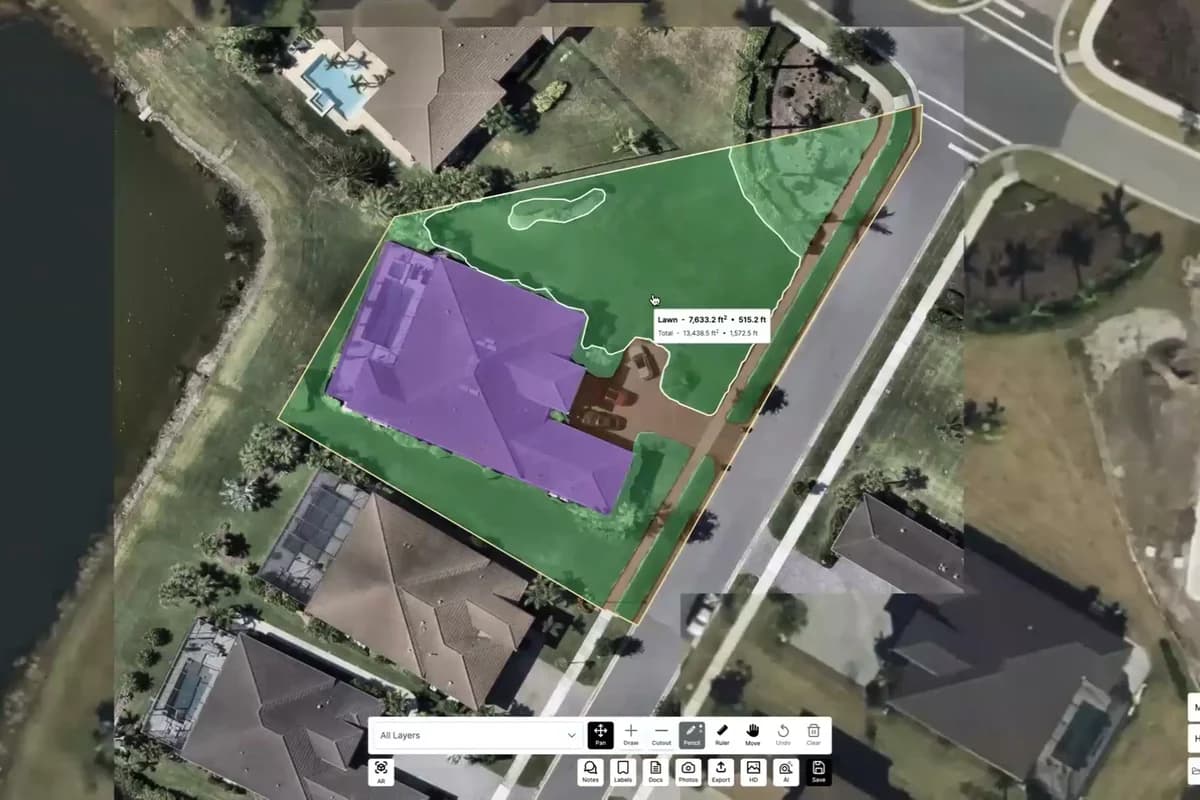
A property measured from aerial imagery, with lawn and hardscape detected as separate coloured surfaces

Method 1

Remote

LaunchPad Map (Cloud)

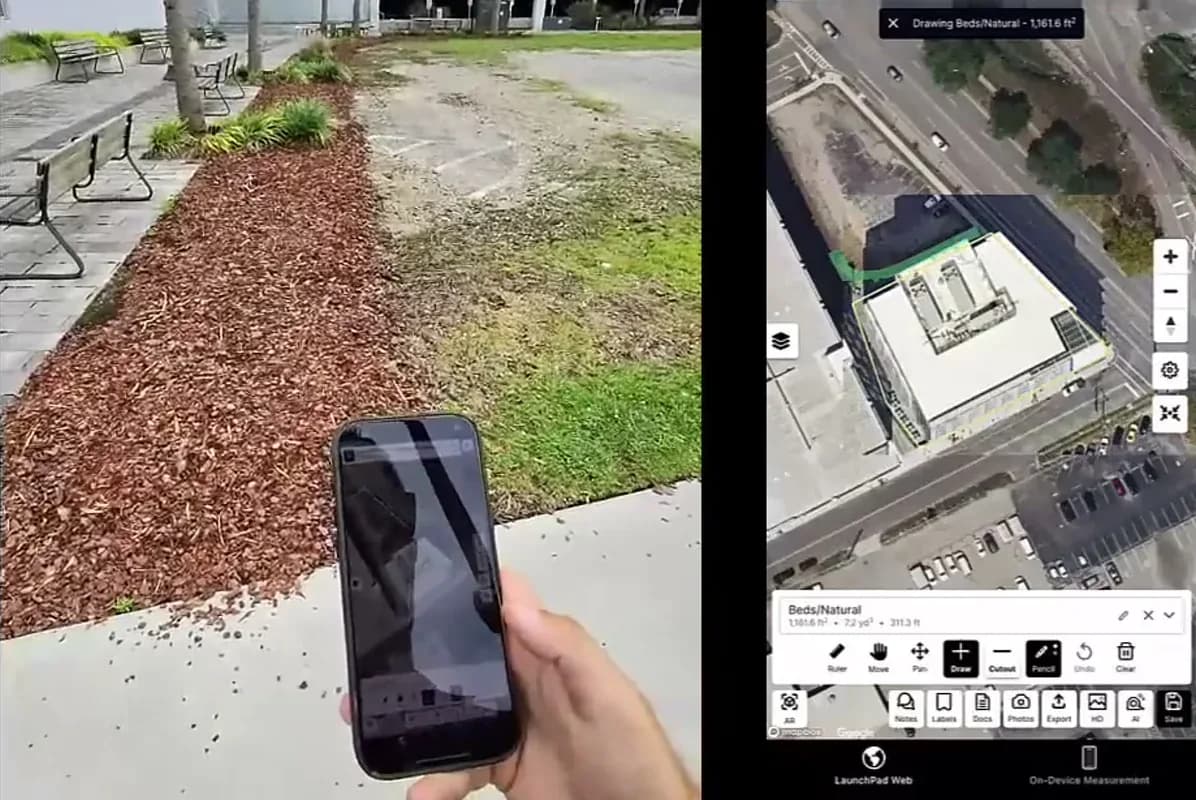
A phone held on-site beside the completed, labelled property measurement

Method 2

On-site

LaunchPad Map (On-Device)

One property record · Get On-Device with every LaunchPad Map plan,
Or run it on its own for $10/mo or $99/yr · 7-day trial, including one complete property free

Get LaunchPad Map On-Device on the App Store →

Need more than measuring?

LaunchPad OS

Meet LaunchPad OS: The system of intelligence for field service operations.

LaunchPad OS replaces the many tools you’re juggling with a system of intelligence that doesn’t just record what happened — it acts on it.

Software built for how your operation actually runs, including every tool you’ll need: business management, CRM, marketing, texts/calls, property measuring in LaunchPad Map, smart routing, mobile, photos/documents, reviews, reputation — and more. No expensive add-ons or integrations required.

LaunchPad Map is included in every LaunchPad OS plan.

See LaunchPad OS
Luna AI chat surfacing three upsell opportunities worth $1,350, with the offers drafted and ready to send

Get started

Ready to reclaim hours each week
spent measuring by hand?

Join your peers who are already measuring faster, quoting with confidence, and winning more work by delivering estimates before the competition. Start your 7-day free trial today; no credit card required. Measure your first property in minutes — remote or on-site.

Start Your Free Trial
Get a free measurement← View all features

No long-term contract, cancel anytime.
Your measurements are yours to keep; export to PDF, image, CSV, or DXF anytime.

Frequently asked questions

The questions every contractor asks first. Answered.

How accurate is LaunchPad Map?

Accurate enough to trust and quote against. You can measure remotely from high-resolution aerial imagery, or walk the property and scan it on-site using AR + LiDAR on your phone to trace the real area as you walk. Either way, you get one number you can stand behind. No more guessing, no “close enough.”

Do I have to drive to every property?

No, that’s the point! LaunchPad Map lets you measure most properties from the address alone. Confirm the boundaries and imagery, and AI returns your measurements and takeoffs in minutes. However, when you do want eyes on the ground, the AR + LiDAR capabilities in LaunchPad Map supports property scanning via mobile device.

What imagery can I measure from?

Your choice of four sources: Google, Mapbox, TomTom, and high-resolution Nearmap. Different properties look clearest on different sources — some days Google has the latest layout, other days Nearmap is sharper — so you pick the clearest, most current view before you measure. Measuring on the standard sources is free; Nearmap HD uses credits (see full details on the Pricing page).

How long does a measurement take?

Under a minute for a typical property. Type the address, confirm the parcel and imagery, and the AI returns your takeoffs — lawns, hard surfaces, and more — measured and ready to quote. Larger or more complex lots take a little longer, but you’re quoting in minutes, not days.

What devices do I need?

Remote measuring runs in any desktop browser. On-site scanning runs on iPhone and iPad. You’ll need a LiDAR-equipped device (iPhone 12 Pro/Pro Max or newer, or an iPad Pro) with the LaunchPad Map app.

What formats can I export?

PDF, image, CSV, and DXF files, plus a shareable interactive map link and annotated reports for clients and crews. From an on-site AR + LiDAR scan, you can also export a 3D terrain model as an .OBJ for design software.

Does it work without a signal in the field?

Yes. On-site scanning works even when fully offline. Your data stays on your device or in iCloud and syncs to the property record once you’re back online.

What else does LaunchPad Map do?

LaunchPad Map is available as a standalone measuring and quoting software. It’s also included with every LaunchPad OS plan, if you need more than LaunchPad Map has to offer. LaunchPad OS includes a full suite of business management tools, marketing & lead capture, remote measuring, CRM, smart routing, crew app with unlimited access, call/text handling, reviews & reputation, and more. You get one platform for one price — there are no add-on subscriptions or per-user fees.

How much does LaunchPad Map cost?

LaunchPad Map starts with a 7-day free trial. No credit card on file required. If you want a property measured before you commit, send us the address and our team will measure it for you. Full plan details can be found on the Pricing page.

What happens to my measurements if I cancel?

They’re yours. You take your measurements and property records with you.

Aren’t free map tools good enough for a rough number?

A rough number is exactly what loses bids and eats margin. A free map tool gives you a polygon and one figure. With LaunchPad Map, you get separate layers like lawn, mulch, and hardscape with driveways and pools excluded, checked against multiple imagery sources — plus photos, notes, and a shareable record on the same property.

One tool is a ruler (hint: it’s the free one); the other, LaunchPad Map, is how the job gets bid, handed off, and serviced.

Would it be faster measuring with a wheel than learning new software?

For one small lawn on a quiet street? Maybe. But for a commercial lot, an HOA, or a back forty you can’t safely walk, LaunchPad Map measures it from the address in minutes — before you’ve even unloaded the wheel. And when a job does need boots on the ground, the AR + LiDAR scan traces the property as you walk. There’s almost nothing to learn: Type an address, confirm the boundaries, get your number.

LaunchPad

The system of intelligence for lawn care, landscaping, artificial turf, snow & ice, and pest & mosquito operations

LAUNCHPAD OS

  • LaunchPad OS
  • LaunchPad Map
  • Implementation
  • Pricing

COMPANY

  • About
  • Careers
  • Contact Us

RESOURCES

  • Content Hub
  • Webinars
  • Events

LEGAL

  • Security
  • EULA
  • Privacy Policy
  • LaunchPad application privacy

© 2026 LaunchPad. All rights reserved.